Table of Contents
Thesis: A chat in the browser is a good start. But the more interesting things happen before sending and after the answer – and that needs a place on one’s own computer.
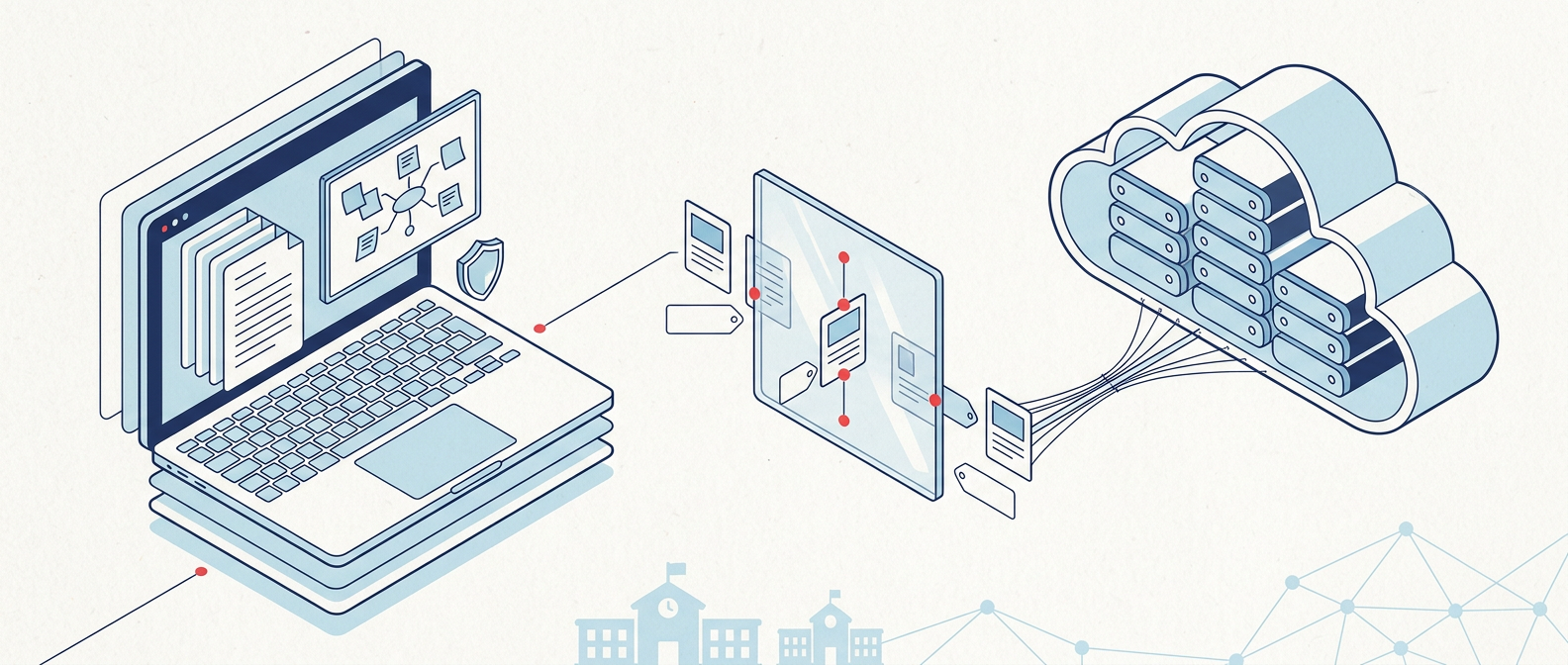
A teacher is preparing a parents’ evening on a Thursday evening. She uses AIS.chat because her state provides it and because the data protection questions are settled. AIS.chat is supposed to phrase the invitation in a friendly way. But her draft contains the names of the parent representatives and a sentence about a pupil who will change classes after the holidays. The terms of use are clear: no personal data. So she removes every name by hand. And last year’s template sits on the school computer as a .doc. AIS.chat doesn’t accept that.
Neither is a flaw of AIS.chat. A web service only sees what arrives in the browser window. What lies on the computer beforehand, and what happens to the answer afterwards, stays hidden from it.
That’s exactly where the experiment I’m writing about starts.
What I built – and how #
AIS.ChatCraft is a native program for AIS.chat and other AI services. It runs on Linux, macOS and Windows, is written in Rust and has a native interface. A web engine is used in exactly one place: interactive learning apps open in a separate, sandboxed preview window. You sign in with the same account as on the web. The code is open on GitHub under the MIT and Apache licences.
One thing up front: AIS.ChatCraft is not an official tool of the AIS.chat team and not an FWU product, but a community experiment. The program says so on first start, too. It’s meant to show what’s possible, so that we discuss the right things.
What I find remarkable is less the program than how it came about. The first commit is from 23 November. Three days later there are some 64,000 lines of Rust, more than 440 automated tests and a CI pipeline that builds and tests on three operating systems. 50 issues are done. The code was essentially written by AI agents working on GitHub issues in parallel. My role: set goals, look at results, make decisions.
So that this doesn’t happen blind, the project has quality gates: tests that pin down a property I care about. One checks that no name from the class list ends up in a request to the service. Another counts how many files the program loads at start-up. When the favourites took almost a minute, the fix came together with such a test – now it’s three seconds. What this way of working feels like would be worth a post of its own.
Local means: the history belongs to the teacher again #
In the browser, the chat history is a list on a server. In AIS.ChatCraft, every chat also lives in a database on the computer. That sounds unspectacular. But it changes what you can do with it.
- Search. Full-text search across all chats, including those imported from AIS.chat. “What did I have on fractions in the spring?” takes seconds.
- Organise. Projects bundle chats with their own instructions – “Biology 7b” or “Parents’ evening”.
- Remember. Memory only comes from the teacher’s own words (“Remember: I teach biology and chemistry”). Answers, web pages and files cannot create notes. Every note shows where it came from.
- Keep working. One click turns an answer into a document or a whiteboard. Formulas, diagrams and mind maps are drawn instead of shown as source. Word, PDF, Excel and PowerPoint files are created right in the program.
- Teaching material. Interactive worksheets can be solved on the computer and printed as worksheet and answer sheet, with a print preview. H5P quizzes are their own kind of content and can be saved as
.h5p– for Moodle, Mebis or ByCS. Why I still consider H5P a transitional technology is in “Is H5P dead?”. - Compare. After “Regenerate”, the old answer stays. You can page between versions.
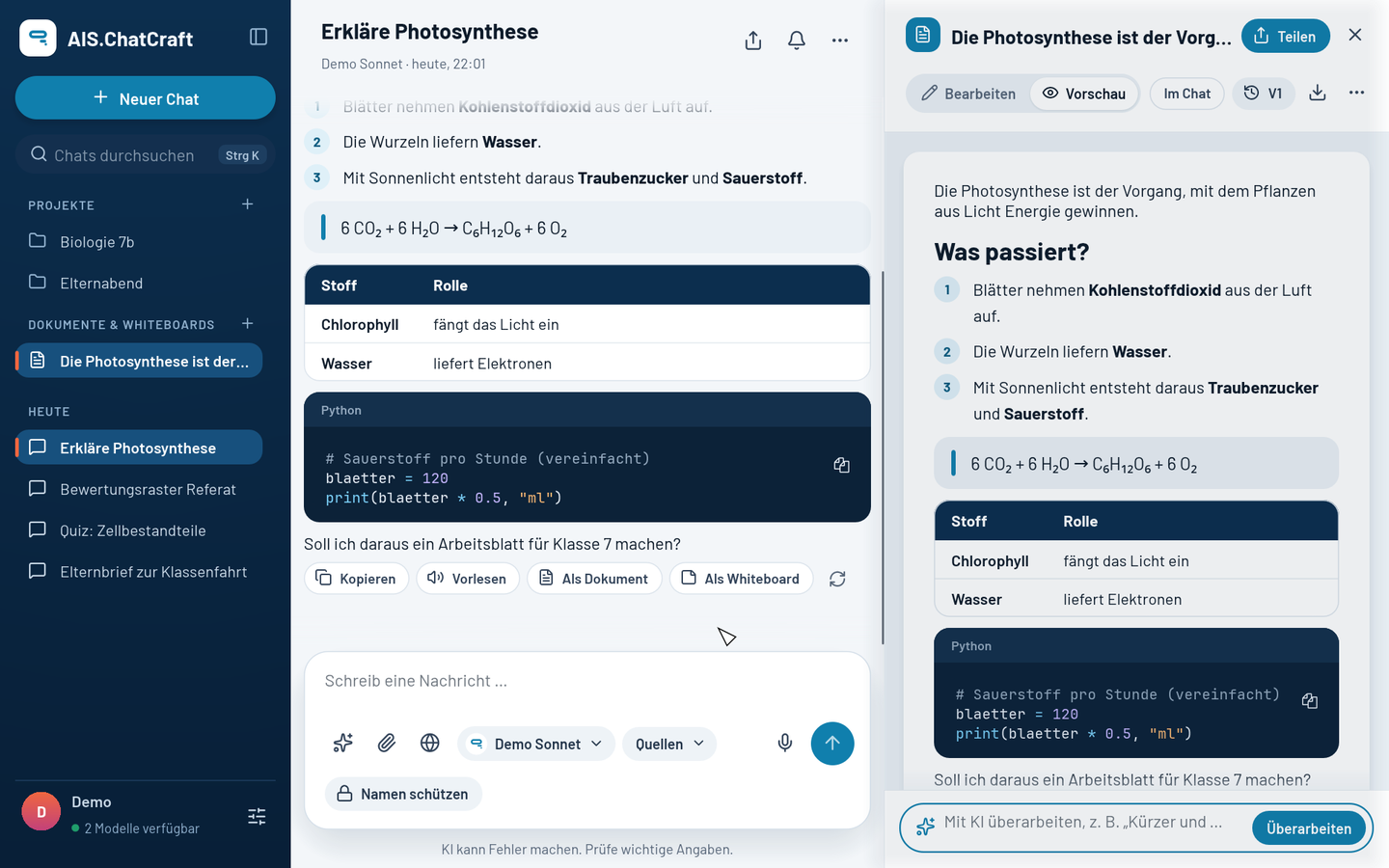
An answer becomes a document you can keep working on. All content in the picture is demo data; the interface is German.
None of this needs a new server. It only needs a place where the teacher’s data may live: her computer.
The most exciting features happen before sending #
What interests me most is what a client can do before a message reaches AIS.chat. Because that’s where it’s decided which data leaves the device.
The clearest example is pseudonymisation. AIS.chat’s terms of use require users not to enter personal data. Bavaria’s notice says it explicitly: no names, addresses or performance data. In everyday work, that rule depends entirely on the teacher’s attention. A client can help.
In AIS.ChatCraft the feature is called “Namen schützen” (protect names). The teacher imports her class list once, as CSV, Excel sheet or contact file. Before sending, the program replaces names with placeholders: “Lea Müller” becomes “[S1] [N1]”, “Leas” (German genitive) becomes “[S1]s”. Email addresses, phone numbers, IBANs, birth dates and addresses are recognised by fixed patterns, the IBAN even by its checksum. Above the input field you see exactly the text that goes out. Where the program is unsure – “Mark” can be a name or a word – it replaces anyway. When in doubt, nothing should go out. One click leaves the match as it is.
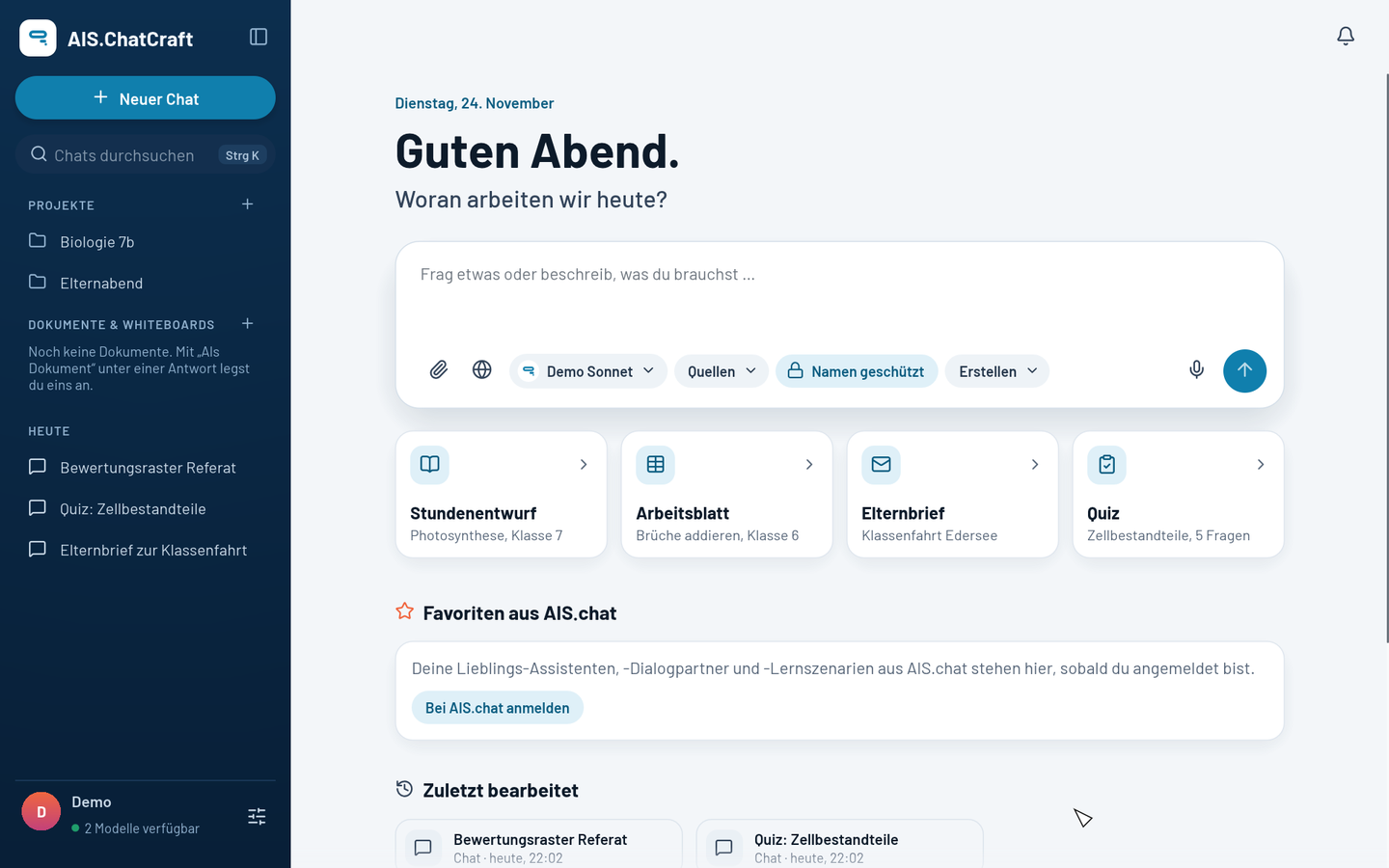
What AIS.chat receives is shown above the input field. The names are made up; the interface is German.
AIS.chat sees no real name, not even in its own history. When the answer comes back, the program puts the names back in locally – for display, copying and export. The mapping “[S1] = Lea” stays on the computer. The pattern isn’t new. Microsoft’s Presidio detects personal data; LLM Guard and PasteGuard replace it and translate back. What’s new is putting it where teachers already work.
The limits are clear: the program doesn’t recognise nicknames, typos, or names in images or scanned PDFs. Local name recognition for names that aren’t on any list is planned as the next step (issue #73).
Two things belong with it, or the safety net turns into a misunderstanding. Pseudonymised data remains personal data under the GDPR – the feature is an extra safeguard, not a licence. And it doesn’t turn AIS.chat into a tool for reports or grades. The terms of use explicitly rule out grading. No client changes that.
More examples from the same category:
- Convert files. AIS.chat accepts
.docx,.pdfor.xlsx, but no.doc, no.pptand no HEIC photos from an iPhone. A client can convert them locally and upload the result. - Send less. Only pages 3 to 7 of a PDF, only one worksheet. That saves token points.
- Strip metadata. Photos from a class trip often carry GPS data. It doesn’t have to go along.
None of these features asks anything of AIS.chat. They happen on the computer, and the teacher sees what goes out before sending.
The first limit: there is no interface for teachers #
Now to the limits. The most important one first.
AIS.chat offers teachers no interface. So the client talks to the same internal endpoints the web interface uses. Technically, these are the “server actions” of a Next.js application. The program reads their identifiers from the website’s JavaScript files. It’s signed in through the session cookie, which expires after eight hours.
There is an API in AIS.chat’s open source code, though. It speaks the common OpenAI format, with chat, model list, images and usage. But its keys belong to projects and are issued by administrators, not by teachers. And it doesn’t know tool calls. What it lacks for a full client I wrote down in issue #70: tool calls, structured output, a sign-in per teacher through VIDIS with a lifetime that survives a schedule early in the morning, and billing against one’s own token points.
That works. But it’s fragile. Any change to AIS.chat can break the client. That’s why the project rules say to compare the client with the public source code of AIS.chat at least once a week. The fact that this source code is open is what makes the experiment possible in a serious way at all.
Incidentally, AIS.chat’s terms of use say nothing about third-party programs – neither allowed nor forbidden. They do say two things: AIS.chat is available “exclusively for one’s own use”. And “excessive or abusive use” can lead to a block. A client that, say, sends requests automatically on a schedule has to be measured against that.
For me, that’s the real insight: a service that offers a documented interface invites exactly such additions. A service without one only allows replicas that wobble with every update. It’s the same question about “doors” I asked in the post about agents – only this time for a client instead of an agent.
The second limit: AIS.chat doesn’t call tools #
Modern AI assistants call tools. Claude reads a file, searches a calendar or creates a document. AIS.chat has its own tools on the server – web search, diagrams, image generation. It cannot call the client’s tools.
My first idea was a workaround: tell the model in the prompt that it may request actions. The client runs them and sends the result back. I had that examined and decided against it. Every round costs token points. The models don’t follow the format reliably and, when in doubt, invent results. And whatever the client sends back appears in the history as if the teacher had written it.
What does work well is an output format. The client briefly describes in the prompt what, say, a worksheet or an H5P quiz looks like. The model answers in one round with a marked block, and the client turns it into an editable object. No loop, no return trip, no extra cost. That’s how the diagrams, learning apps, worksheets, H5P quizzes, whiteboards and calendar files from AIS.chat come about in AIS.ChatCraft. The format description sits collapsed under the question in the chat, so the history stays readable.
The third limit: local doesn’t automatically mean private #
A local program sounds like privacy. That’s only partly true.
Whatever goes to AIS.chat is processed by AIS.chat – under its rules. According to the privacy notice, the controller under the GDPR is the school. The FWU runs the system as a processor. A client can send less, but it can’t take on less responsibility.
And it brings questions of its own. AIS.chat itself provides for saving chats as a file on one’s own computer – there’s an export for that. A local database is essentially the same thing, only permanent and searchable. So the school’s rules for official and private devices apply to it. What happens when the same client also sends to Claude or another provider? Then different contracts apply, and the decision lies with the teacher and her school. That’s why AIS.ChatCraft keeps credentials in the operating system’s keychain, never in the database. And every action that changes something needs an explicit yes.
One obligation from the terms of use a client can even make easier: outputs that are reused must be labelled as AI-generated, and the prompt should be stated. So when saving, AIS.ChatCraft automatically adds “Created with AI (AIS.chat, model …), date” to Word, PDF, Excel, worksheets, H5P and calendar files – and the prompt, if you want.
Honestly, this is the part where I expect – and need – the most discussion. A client shifts responsibility from an operated service to a device. For an individual teacher that can be a gain. For a school with managed devices, the calculation looks different.
A tour: what the program can do today #
So far this has been about ideas. Here is the state as of 25 November, feature by feature. Everything works with AIS.chat unless I say otherwise. Some things only work with services that support tools – Claude or an OpenAI-compatible server. I mark those.
Getting started and chatting #
- Start page. With no chat open, the program shows a start page: the input field at the top, below it suggestions such as “lesson plan” or “letter to parents”, recently edited items, favourites, upcoming schedules and the remaining token points.
- Assistants and learning scenarios. “Entdecken” shows everything AIS.chat offers – your own, shared within the school, and official entries. A star makes an entry a favourite. That carries over to the browser.
- Several services. Besides AIS.chat you can add Claude, OpenAI or a model on your own computer (Ollama, LM Studio). You can switch models in the middle of a chat.
- Versions. Editing and “regenerate” overwrite nothing. ‹ 1/2 › flips between answers.
- Thinking. Models that think before answering show a collapsed summary of it above the answer. With AIS.chat, the analysis steps appear there.
- Answer style. Per chat: normal, concise, explanatory, formal – or your own style based on a sample text, such as last term’s letter to parents. Only the tone is taken over, not the content.
- Temporary chat. A chat that lives only in memory. It shows up in no list, no search and no memory. Close it and it’s gone. AIS.chat itself still keeps it in its history – and the program says so.
- Quick entry. A desktop shortcut calls
aiscraft --quick. The window comes to the front with an empty chat, optionally with a screenshot attached. The program doesn’t listen to your keyboard for this. - Dictation and read-aloud. Speech lands as text in the input field (this needs a service with speech recognition). AIS.chat reads answers aloud on request.
Working with answers #
- Save as. Any answer goes to disk as Word, PDF or Markdown with one click. Excel takes the answer’s tables, one per sheet, and numbers stay numbers.
- Dates. If an answer contains dates – as a calendar block or a table with a date column – the program saves them as an
.icsfile for Outlook, Thunderbird or the iPad. - Readability. On request under each answer: word count, Flesch score, LIX, roughly which grade, and which sentences are too long. It’s computed on the computer. For differentiation and plain language, it’s a quick check whether the text fits.
- Documents and whiteboards. An answer becomes an editable document or a whiteboard. “Revise with AI” creates a new version and keeps the old one. An outline becomes a mind map.
- Whiteboards straight from AIS.chat. “Erstellen › Whiteboard” asks for a mind map, cluster, flow or timeline. AIS.chat supplies the content, the program lays it out.
- Formulas and diagrams are drawn instead of shown as source.
- Check links. One click requests each address in an answer once and strikes out dead links. Invented sources stand out faster.
- Citations. With Claude, attached files go along as documents. The answer then says which passage backs which statement. A click shows the passage in the file.
- Co-editing. Documents and whiteboards can be shared live with colleagues, via a server run by, say, the school’s maintaining body. Without a server everything stays local.
Teaching material #
- Worksheets with nine task types: multiple choice, true or false, cloze, matching, ordering, short answer, number with tolerance, free text and info text. Pupils solve them on the computer, you check them, and you print a worksheet and an answer sheet, with print preview. Points can be switched off, globally and per sheet.
- Learning apps are small interactive programs in a single HTML file, such as a fractions trainer. They run in an isolated window that allows no outside connections. Saved, they run offline in any browser.
- H5P quizzes are their own kind of content and go into Moodle, Mebis or ByCS as an
.h5pfile. Existing.h5pfiles can be opened and edited.
Organising, searching, remembering #
- Search. Ctrl+F searches the open chat and jumps from hit to hit. Searching all chats finds titles first, then content.
- Projects group chats with shared instructions.
- Memory. Notes come only from your own words (“Remember: …”). Each note shows where it came from.
- Recall. Matching excerpts from earlier chats can go along as context. Below the message it says what went along.
- Sources per chat. A menu sets what a chat may use: memory, project instructions, earlier chats, web search, connectors. Chats with Claude don’t reach AIS.chat unasked.
Preparing files #
- Converting.
.doc,.xls,.ppt, RTF, e-books, e-mails and iPhone photos are converted before upload into formats AIS.chat accepts. - Sending part of a file. “Only pages 3–7”, “only the sheet Grades”, “only slides 2–5” – entered on the attachment.
- Removing metadata. Location and camera data stay on the device.
Protecting and staying in control #
- Protect names – see above.
- AI label. Whatever you save from an AIS.chat answer carries the note “Created with AI”, as the terms of use require. Copying stays unchanged. A right-click offers “copy with label”.
- Usage. AIS.chat token points, tokens per service and month, costs for Claude, plus a monthly limit after which the program asks before sending.
- Vault. The program fills in credentials for connectors itself. The model only sees placeholders.
Tools and automation (with Claude or OpenAI-compatible services) #
- Connectors are MCP servers, for example for an Obsidian vault or local files. Models call their tools.
- Approvals and trust check. Anything that only reads runs directly. Everything else runs only if you asked for it. Otherwise the program asks – with exactly the details that would be executed, recipient and date in bold. One request covers all the steps it needs. An approval never runs twice, not even after a crash.
- Own rules. “Always add appointments” allows, “never send e-mails to parents” forbids. Prohibitions always win.
- Action log. Every action is logged with its target and reason: “read only”, “your request” with your own words, “your rule” or “your approval”. It can be exported as a spreadsheet.
- Schedules and tasks. A job runs on a schedule, say weekdays at seven. Tasks run in the background while you keep chatting. Neither ever runs anything that needs an approval.
- Files from the model. Excel with formulas, PowerPoint with speaker notes, Word and PDF – without the program running any of the model’s code.
Looks #
Three looks: “Modern”, “Glas” and “Omarchy”, which takes the desktop’s colours. Plus light, dark or follow the system. On first start the program asks – and points out that it is a community experiment.
The list is long. And that, for me, is the real point: almost none of it needs anything new from AIS.chat. It only needs a place on the teacher’s computer.
What I take from this #
If I sum it up for myself: a separate client for AIS.chat is possible, and it can take work off teachers’ hands that a browser window can’t. The most valuable parts happen before sending – replacing names, converting files, sending less. They help keep AIS.chat’s rules. They don’t move them.
The limits aren’t in the client. They’re in the interface. As long as AIS.chat doesn’t open a documented interface to teachers, every client remains a replica with an expiry date. So the more interesting question isn’t whether you can build such an app. It is: which door should AIS.chat open itself, so that such additions become safe and lasting?
Anyone who wants to join the discussion or help build: the project is open, and ideas and bug reports are welcome as issues.
Transparency: I counted the project figures in the repository on 25 November 2026. The screenshots show demo data with made-up names. AI assisted with drafting and structuring this post. Responsibility and approval remain with me.